The Complete Website Redesign Checklist for Businesses in 2026
A website redesign can improve conversions, SEO performance, user experience, and long-term scalability—but only when it's planned correctly. This complete website redesign checklist for 2026 covers redesign planning, SEO migration, website redesign costs, common mistakes, and practical recommendations from a lead full stack engineer who has overseen numerous redesigns and rebuild projects.
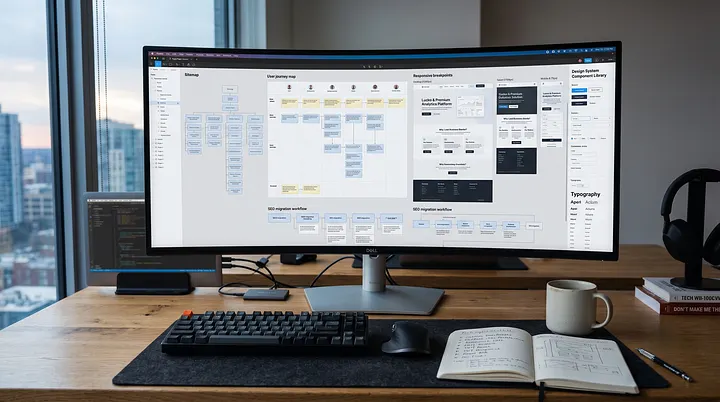
A surprising number of businesses redesign their websites every few years yet see little improvement in leads, conversions, or search rankings.
I've reviewed websites that looked modern after a redesign but generated fewer enquiries than the previous version. I've also seen businesses lose years of SEO value because important pages disappeared during migration.
The issue usually isn't the redesign itself. It's the lack of a proper plan.
A successful redesign is part business strategy, part user experience improvement, part technical execution, and part SEO preservation. Businesses that invest in modern development approaches often see better long-term results through scalable architecture, stronger performance, and improved maintainability.
This website redesign checklist is designed to help business owners, marketing managers, startups, and growing organizations approach redesign projects correctly in 2026. Whether you're rebuilding a service website, migrating platforms, or planning a complete digital transformation, this guide covers the steps that matter most.
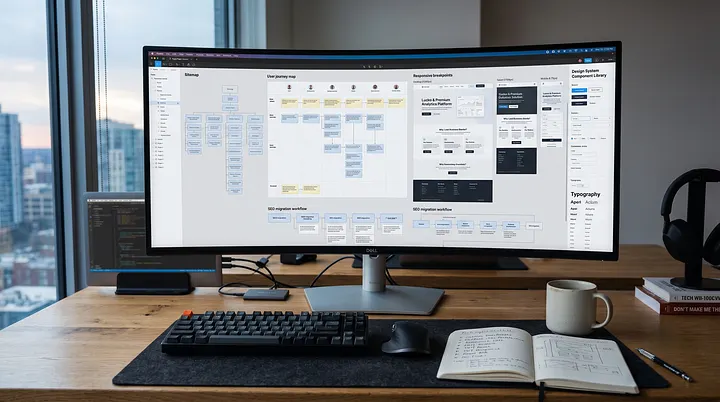
How Do You Know It's Time for a Website Redesign?
Not every website needs a complete rebuild.
In many cases, businesses can achieve significant improvements through targeted updates. However, there are situations where a full redesign becomes necessary.
Outdated Design
First impressions still matter.
If your website feels several years behind industry standards, visitors may question the credibility of your business before they even read your content.
Common signs include:
Inconsistent layouts
Outdated typography
Poor visual hierarchy
Cluttered pages
Non-responsive design elements
Poor Conversion Rates
Traffic alone doesn't generate revenue.
If visitors are arriving but not submitting enquiries, requesting quotes, booking demos, or making purchases, the issue may be tied to:
Poor user experience
Weak calls-to-action
Confusing navigation
Slow performance
A redesign should focus on conversion improvement rather than appearance alone.
Slow Website Performance
Website speed directly impacts user behavior.
I've worked on projects where reducing load times from six seconds to under two seconds significantly improved engagement and lead generation.
Performance challenges aren't always caused by design choices. Hosting environments, server configuration, caching strategies, and maintenance practices frequently contribute to slow websites. Poor hosting
Unoptimized images
Legacy themes
Excessive plugins
Inefficient codebases
Mobile Experience Issues
Mobile traffic now dominates many industries.
If your website still treats mobile as an afterthought, you're likely losing opportunities every day.
Watch for:
Difficult navigation
Small tap targets
Slow mobile performance
Broken layouts
Poor readability
SEO Limitations
Older websites often develop technical SEO issues over time. In many cases, the underlying rendering approach can also impact crawlability and indexing, particularly for content-heavy websites.
Examples include:
Duplicate content
Poor URL structures
Missing metadata
Indexing issues
Weak internal linking
A business website redesign can address these limitations while preserving existing rankings.
Difficult Content Management
If every content update requires developer involvement, your CMS may be limiting growth.
Modern content workflows should allow marketing teams to publish and update content efficiently.
Rebranding
A new brand identity often requires more than visual changes.
Logos, messaging, service positioning, user journeys, and content architecture may all need updates.
Business Growth
Many websites simply outgrow their original purpose.
A company that started with five services may now offer twenty. New departments, markets, products, and customer segments often require significant structural changes.
Website Redesign vs Website Refresh
One of the biggest mistakes businesses make is choosing a redesign when they only need a refresh—or vice versa.
Factor | Website Refresh | Website Redesign |
|---|---|---|
Visual Updates | Minor | Extensive |
Content Updates | Moderate | Significant |
Navigation Changes | Limited | Major |
Platform Migration | No | Often |
UX Improvements | Small | Extensive |
SEO Impact | Lower | Higher |
Technical Changes | Minimal | Significant |
Cost | Lower | Higher |
Timeline | Weeks | Months |
When a Refresh Makes Sense
A refresh is typically appropriate when:
Branding has evolved slightly
Content needs updating
Design feels dated but functional
Performance remains acceptable
When a Redesign Makes Sense
A redesign is usually necessary when:
Conversion rates are poor
Site architecture is outdated
SEO limitations exist
Technology is difficult to maintain
Platform migration is required
The cost difference can be substantial, which is why proper website redesign planning matters before committing resources.
The Complete Website Redesign Checklist
This is the framework we typically follow before launching redesign projects.
1. Define Business Goals
Why It Matters
Without clear objectives, redesign projects become subjective.
Goals might include:
Increase leads by 30%
Improve demo requests
Reduce bounce rate
Improve search visibility
Support expansion into new markets
Common Mistakes
Focusing only on aesthetics
No measurable KPIs
Conflicting stakeholder priorities
Expert Recommendation
Establish measurable business outcomes before discussing design concepts.
2. Audit Existing Website Performance
Why It Matters
You need baseline data before making changes.
Review:
Traffic sources
Top pages
Conversion rates
Bounce rates
Revenue attribution
Common Mistakes
Removing pages that currently generate traffic.
Expert Recommendation
Identify high-performing assets and protect them during migration.
3. Analyze User Behavior
Why It Matters
Real user behavior often reveals issues stakeholders miss.
Review:
Heatmaps
Session recordings
User journeys
Exit pages
Common Mistakes
Making assumptions without data.
Expert Recommendation
Let actual behavior influence redesign decisions.
4. Review SEO Assets
Why It Matters
Your current rankings represent years of accumulated value.
Review:
Ranking pages
Backlinks
Metadata
Indexed URLs
Internal links
Common Mistakes
Launching without SEO migration planning.
Expert Recommendation
Create a complete SEO inventory before development begins.
5. Evaluate Technical Infrastructure
Why It Matters
Technology choices affect future scalability.
Review:
Hosting
CMS
Database structure
Security
Integrations
Common Mistakes
Building on outdated infrastructure.
Expert Recommendation
Choose technology based on business requirements, not trends. Whether you're considering WordPress, Laravel, Next.js, or other frameworks, the technology stack should support future growth rather than current limitations.
6. Plan New Site Architecture
Why It Matters
Site structure impacts usability and SEO.
Review:
Navigation hierarchy
Service organization
Internal linking
User pathways
Common Mistakes
Copying old navigation blindly.
Expert Recommendation
Rebuild architecture around user intent.
7. Improve Conversion Paths
Why It Matters
More traffic without conversions creates little business value. Effective conversion optimization focuses on reducing friction throughout the customer journey rather than simply increasing traffic volumes.
Review:
Forms
CTAs
Landing pages
Sales funnels
Common Mistakes
Hiding primary actions.
Expert Recommendation
Every important page should support a clear next step.
8. Optimize Mobile Experience
Why It Matters
Mobile-first design is no longer optional.
Common Mistakes
Designing desktop experiences first.
Expert Recommendation
Test real devices throughout development.
9. Prepare Content Migration
Why It Matters
Content migrations often create unexpected delays.
Common Mistakes
Migrating everything.
Expert Recommendation
Remove outdated content before migration.
10. Implement Technical SEO
Why It Matters
Technical SEO should be integrated into development.
Include:
Metadata
Structured data
XML sitemaps
Canonical tags
Robots directives
Common Mistakes
Treating SEO as a post-launch task.
Expert Recommendation
Build SEO requirements into project specifications.
11. Improve Website Speed
Why It Matters
Performance influences rankings, conversions, and user satisfaction.
Common Mistakes
Ignoring performance until launch.
Expert Recommendation
Measure Core Web Vitals throughout development.
12. Configure Analytics Tracking
Why It Matters
You cannot improve what you cannot measure.
Track:
Leads
Form submissions
Calls
Downloads
Revenue events
Common Mistakes
Losing historical measurement continuity.
Expert Recommendation
Validate tracking before launch.
13. Test Across Devices
Why It Matters
Different devices behave differently.
Common Mistakes
Testing only on internal team devices.
Expert Recommendation
Test common browsers, operating systems, and screen sizes.
14. Validate Redirects
Why It Matters
Redirects preserve SEO authority.
Common Mistakes
Redirecting everything to the homepage.
Expert Recommendation
Use page-level redirects whenever possible.
15. Launch & Monitor
Why It Matters
Launch day is the beginning, not the end.
Monitor:
Traffic
Rankings
Conversions
Crawl errors
Site performance
Common Mistakes
Assuming launch equals completion.
Expert Recommendation
Schedule a 30-day monitoring period after deployment.
Website Redesign Cost in 2026
One of the most common questions businesses ask is about website redesign cost.
The honest answer is that costs vary significantly based on scope, complexity, and technical requirements.
Small Business Websites
Typical Range:
$2,500–$10,000
Usually includes:
Design refresh
CMS improvements
Basic SEO updates
Limited integrations
Service-Based Business Websites
Typical Range:
$8,000–$30,000
Usually includes:
UX improvements
Conversion optimization
SEO migration
CRM integration
Custom functionality
Corporate Websites
Typical Range:
$25,000–$100,000+
Usually includes:
Complex architecture
Multiple stakeholder workflows
Enterprise integrations
Accessibility requirements
Custom Platforms
Typical Range:
$50,000–$250,000+
Usually includes:
Custom applications
Membership systems
Dashboards
API integrations
Advanced workflows
Factors Affecting Cost
Design Complexity
Custom interfaces require additional strategy, design, and testing.
CMS Selection
WordPress, Laravel, headless CMS solutions, and custom platforms have different development requirements.
SEO Migration
Protecting rankings requires planning and implementation time.
Third-Party Integrations
CRM systems, payment gateways, ERP platforms, and marketing tools increase complexity.
Custom Features
Unique business functionality often represents the largest portion of project costs.
The cheapest redesign is rarely the most cost-effective option. Long-term maintainability and business outcomes matter more than initial price.
Common Website Redesign Mistakes
Ignoring SEO
Businesses sometimes launch redesigned websites and discover traffic has dropped dramatically.
Most SEO losses are preventable.
No Redirect Strategy
Old URLs still have value.
Without redirects, search engines and users encounter dead pages.
Redesigning Without Goals
Visual improvements alone rarely justify project investment.
Choosing Design Over Usability
A website exists to support business outcomes.
Beautiful interfaces that confuse users often perform poorly.
Poor Content Migration
Missing pages, broken links, and outdated information create unnecessary problems.
Slow Website Performance
Modern design elements should never come at the expense of speed.
Not Measuring Conversions
Many businesses redesign websites without understanding whether the redesign improved results.
Measurement should begin before development starts.
From an Engineer's Perspective
Over the past several years, I've worked on redesign projects involving WordPress migrations, Laravel applications, Next.js implementations, performance optimization initiatives, and complete platform rebuilds.
One of the most expensive mistakes I see during redesign projects is when businesses focus entirely on visual changes while ignoring technical foundations.
A beautiful website won't generate results if it loads slowly or creates SEO issues.
Another recurring issue is underestimating content migration.
Businesses often assume content can simply be copied into a new system. In reality, migrations frequently reveal duplicated pages, inconsistent messaging, broken media assets, and outdated information.
I'm also seeing more organizations move toward performance-focused architectures using modern frameworks and optimized hosting environments. When implemented correctly, these approaches can dramatically improve both user experience and maintainability.
The best redesign projects start with business goals and user needs—not design trends.
Technology should support strategy, not define it.
What We've Learned at WebMixStudio
After working on redesigns across multiple industries, several patterns appear consistently.
Businesses often wait too long before redesigning.
By the time performance issues become obvious, technical debt has usually accumulated across content, infrastructure, SEO, and user experience.
Another common challenge is stakeholder alignment.
Marketing teams, leadership, sales departments, and operational teams often have different priorities. Successful projects establish clear objectives early and keep decisions tied to measurable outcomes. Strong design systems and consistent user experiences also make future website improvements significantly easier.
We've also learned that preserving existing strengths is just as important as fixing weaknesses.
The highest-performing redesigns aren't complete reinventions.
They're carefully planned improvements that retain valuable SEO assets, strengthen conversion paths, improve performance, and create a more scalable foundation for future growth.
The most successful website redesign strategy combines business objectives, user experience improvements, technical excellence, and long-term maintainability.
FAQ
How often should a website be redesigned?
Most businesses should evaluate their websites every two to three years and consider a redesign every three to five years depending on performance, technology, and business changes.
How much does a website redesign cost?
Website redesign cost varies significantly. Small business projects may start around $2,500, while complex corporate platforms can exceed $100,000.
Can a redesign hurt SEO?
Yes. Poorly planned redesigns can reduce rankings and traffic. Proper redirects, SEO audits, and migration planning help prevent losses.
How long does a website redesign take?
Most projects take between six weeks and six months depending on complexity, approvals, content requirements, and technical scope.
What is included in a website redesign?
A redesign may include UX improvements, visual updates, content restructuring, SEO optimization, performance improvements, and technical redevelopment.
Should I redesign or rebuild my website?
If architecture, technology, and performance issues exist, a rebuild may be more effective than a surface-level redesign.
How do I prevent traffic loss during a redesign?
Perform an SEO audit, preserve high-performing content, implement redirects, and monitor rankings after launch.
What is the first step in a website redesign project?
The first step is defining clear business goals and measurable success metrics before discussing design or development.
Conclusion
A successful redesign isn't about making a website look newer.
It's about improving performance, usability, visibility, and business outcomes.
The most effective projects begin with clear goals, follow a structured website redesign process, protect existing SEO value, and focus on measurable improvements rather than visual trends.
Following a comprehensive website redesign checklist helps ensure every investment contributes to long-term growth rather than short-term cosmetic changes.
Whether you're planning a business website redesign, evaluating website redesign cost, or building a website redesign strategy for the next stage of growth, preparation remains the most important factor in project success.
Need Expert Guidance?
If you're considering a website redesign and want guidance from engineers who focus on performance, SEO, scalability, and long-term maintainability, explore our web design and development services or schedule a conversation with the team before starting your project.
Written By

Kuldeep Sharma
Software Engineer
Software Engineer | Full-Stack Developer (React, Node, Python) | Built Multiple SaaS Products | System Design & APIs
Keep Reading
More insights from the WebMixStudio team.

PHP2Shell: How to Patch CVE-2026-109618 and CVE-2026-109619 in PHP, WordPress and Laravel
Next.js App Router in Production: 5 Architectural Mistakes Crashing Your Core Web Vitals & Server Costs